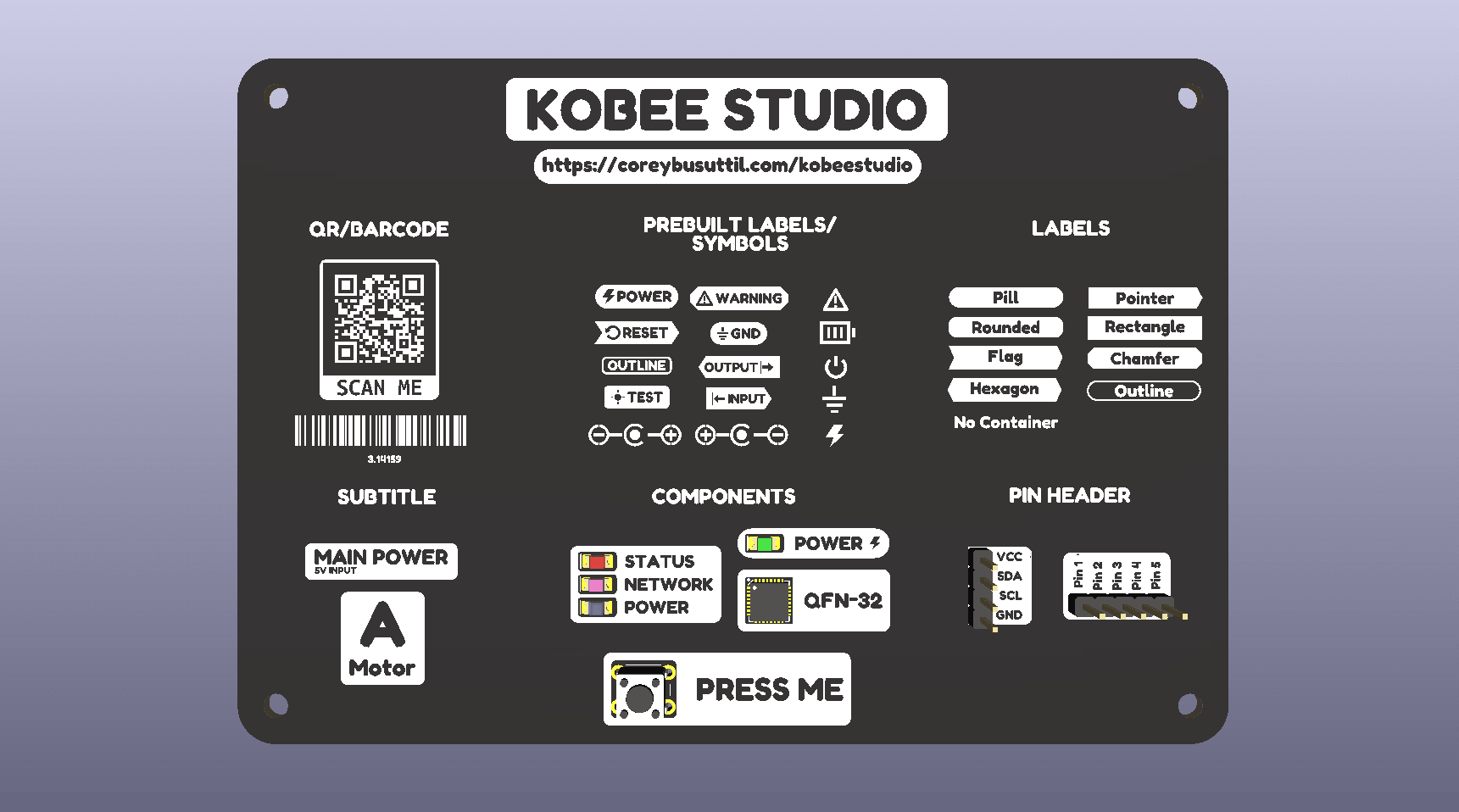
Kobee Studio began as a maintained evolution of KiBuzzard, but the direction is broader: a friendly, manufacturing-aware graphics and labelling studio inside KiCad PCB Editor.
This is a working roadmap, not a promise that every idea will ship. The order matters: reliable, editable board artwork and a calm workflow come before clever automation.
Next up
Shipped
- Migrated to the new IPC API plugin away from deprecated Python SWIG bindings.
- Completed backward-compatible IPC testing with existing Kobee Studio artwork on KiCad 10 for macOS.
Next validations
- Repeat the complete IPC workflow on KiCad 10 for Windows.
- Test the complete KiCad 11 workflow.
What 1.3.0 includes
Labels and visual language
- Parametric labels with plain text, rectangles, rounded rectangles, pills, flags, tabs, pointers, chamfers and hexagons.
- Filled, inverted and outline appearances with independent padding, border thickness and corner-radius controls.
- Mixed end treatments, including independent square/rounded ends where a shape supports them.
- Optional exported underline geometry beneath the main label text.
- Forward-slash and backslash insertion alongside the existing special-character shortcuts.
- Text-plus-icon and icon-only layouts; icons can also be placed without a container.
- Searchable quick-label picker with common power, test, programming, interface, signal and control labels.
- A first PCB-safe icon set covering power, ground, polarity, warning, LED, battery, input/output, buttons and test points.
Connector overlays
- Configurable 2.54 mm single-row header blocks with one label per pin.
- Exact 2.54 mm pitch, vertical/horizontal orientation, selected pin-1 end and selected pin side.
- Adjustable outer, pin-to-label, pin-1 and far-end spacing so overlays fit real plugs rather than only bare headers.
- Optional continuous or per-pin openings, with adjustable opening width and extension.
- Editable output that sits over an electrical footprint without replacing it.
Machine-readable artwork and layers
- QR codes with payload checks, four-module quiet zones, rounded frames, adjustable frame spacing and optional knockout footer text.
- Compact Code 128 barcodes with minimum module/bar-height safeguards.
- Optional editable human-readable text below QR codes and Code 128 barcodes, independent from the encoded payload.
- Front and bottom silkscreen, copper and solder-mask output, including correct single mirroring on the bottom side.
- Generated artwork is editable KiCad footprint geometry and existing Kobee Studio items can be reopened for editing.
Foundation and release work
- KiCad 10 development and regression testing on macOS and Windows.
- Stable buffered preview and automated KiCad/Gerber regression coverage.
- An always-visible in-app Need help? link to the hosted Kobee Studio documentation hub.
- Versioned 1.2.1 PCM package and release notes prepared for manual installation.
- A KiCad schema-valid IPC release using
com.github.mrcpuddington.kobeestudio, a directplugins/layout and a 64 × 64 catalog icon. - Attribution, licensing and a contributor-friendly source installation path.
Next: make 1.3 dependable
These are the highest-value, least speculative improvements. They should be finished before adding a large new tool category.
Quality, compatibility and editing
Already validated
- Tested the complete KiCad 10 workflow on Windows and fixed platform-specific UI, font and placement problems.
Quality refinements
- Test the complete KiCad 10 workflow on Linux.
- Continue hardening reopening/editing of existing Kobee Studio artwork, including older compatible KiBuzzard labels.
- Add regression fixtures for every built-in icon, label shape, header orientation and output layer.
- Make font metrics, line spacing and icon/text alignment consistent across preview and generated artwork.
- Improve input validation with useful, non-crashing messages for impossible text sizes, barcode dimensions and header geometry.
- Add an explicit compatibility matrix and a small set of real fabricated-board examples.
Finish the current workflows
Shipped in 1.3
- Component-highlight labels and callouts with editable safe zones for common chip packages, switches, LEDs, buttons and custom component envelopes.
- Vertical and horizontal component arrays with configurable count, centre spacing, one cutout per component and one label per row.
- Secondary title/subtitle text with matching type by default and an optional typeface override.
Project-health refinements
- Better fixed-width labels, multiline labels and alignment controls.
- Favourites and recently used quick labels, icons and styles.
- Expand and refine the icon library only after each new icon has a footprint/render regression test.
- Add a first-party Kobee visual style: sensible type, spacing, border and layer defaults for a coherent board look.
- Make the quick-label and symbol picker keyboard-first, with reliable previews and category filtering.
Safer manufacturing output
- Layer-aware preview colours, front/back context and plain-language explanations of each output layer.
- Silkscreen proximity warnings for pads, holes and board edges.
- Copper minimum-feature and clearance warnings.
- Solder-mask opening warnings and clearer previewing of mask artwork.
- QR and barcode print-size guidance, plus a simple “likely scannable” validation report.
Likely product expansion
These features fit the core product well once the current release is stable across platforms.
More connector and annotation tools
- Dual-row 2×N header overlays.
- Connector callouts and compact pinout tables.
- Read pad positions, pitch and dimensions from a selected connector footprint rather than asking for every value.
- Support common terminal blocks, JST-style connectors and edge connectors after the footprint-driven foundation exists.
- Leader lines and anchored callouts that remain easy to edit.
- Test-point, probe-point and measurement legends.
Styles, templates and repeatable design systems
- Saved user presets and project-local presets that can be committed with a KiCad project.
- Named typography, spacing and layer presets for a whole project.
- Importable/exportable style packs, including an approachable Kobee starter pack.
- Reusable templates for interface labels, power areas, warnings, revision blocks and test areas.
- Batch generation from pasted data or CSV for connector labels, serials, revisions and board variants.
- Bulk restyling of selected existing Kobee Studio items.
Artwork and data tools
- SVG import with scale, rotation, crop, alignment and safe path simplification.
- Minimum-feature and malformed-path warnings for imported artwork.
- More barcode symbologies, configurable QR error correction, Data Matrix and serial-number markings.
- Project-field templates for revision, date, URL, board name and other repeatable text.
- Fabrication and User-layer artwork, with clear guidance that decorative artwork does not belong on Courtyard.
Distribution and project health
Project-health work shipped
- Made the source and release process suitable for an official public KiCad Plugin and Content Manager submission.
Next refinements
- Complete Windows IPC validation and submit the stable 1.3 metadata to KiCad's official package repository.
- Publish release notes, checksums and a known-good example board for every release.
- Add a lightweight crash/error report template that captures KiCad version, platform and reproducible inputs.
- Document a migration and compatibility policy before presets or project files become common.
Ambitious: Silk Studio
These are substantial but coherent extensions of Kobee Studio. They should be built only after styles, document format and manufacturing safeguards are solid.
- A full Silk Studio workspace with a large live canvas, object list, property inspector and layer controls.
- Non-destructive composition documents, undo/history and reusable multi-object templates.
- A project style editor that can show and apply typography, spacing and branding consistency across a board.
- Board manufacturing preview: front/back views, minimum-feature overlays and selectable fabricator profiles.
- Batch annotation workflows for complete connector groups, board variants and production markings.
- Community icon, template and style packs with visible licence and attribution information.
- A dedicated courtyard-envelope tool for legitimate placement/clearance documentation—never general decorative courtyard drawing.
Experimental / further out
These are interesting directions, but they require deeper board awareness and must remain reviewable by the designer.
- Find unlabeled connectors, switches, LEDs and test points on a board.
- Generate a draft board legend from footprints, pads, nets and project fields.
- Suggest several label positions while avoiding pads, vias, tracks, courtyards, existing artwork and board edges.
- Route editable leader lines from a callout to a pin or component.
- Keep smart labels in sync when connector names, net names or project fields change.
- Audit a board for visual consistency: typography, naming, spacing, contrast and missing legends.
- Compare two board revisions and highlight changed labels, callouts and production markings.
- Create net-aware copper art that intentionally connects to a selected net, with robust clearance safeguards.
- Assisted layout that proposes rather than silently applies artwork changes.
How we choose the next thing
Before a feature moves from this page into development, it should answer four questions:
- Does it make a real board clearer, safer to use or faster to document?
- Can it remain editable and understandable in ordinary KiCad data?
- Can we preview it honestly and validate it against manufacturing constraints?
- Can it be tested on supported platforms without making the main workflow harder to use?
If the answer is no, it belongs in the experimental list until the foundation catches up.